


I tend to judge download tools by what happens after the first tap: does the file arrive without confusion, can I find it later, and does the app remain useful when I am saving several items rather than just testing one? Video Downloader for Pinterest is built for that narrow job. It is a free Android app in the video players and editors category from Video Download Studio, aimed at saving Pinterest videos, GIFs, and images for offline viewing. In my experience, that focused purpose is its main appeal, but it also defines its limits.
The app has a 4.8 average from around 159 thousand ratings, with roughly 1.5 thousand written reviews and over 5 million installs. Those figures suggest that it has found a large audience among people who want a simpler route from a Pinterest post to a file stored on their phone. It is rated for Everyone, and the current version is 1.9.2. The app is free, which makes it easy to try without committing to a subscription or purchase.
What the Pinterest downloader feels like in everyday use
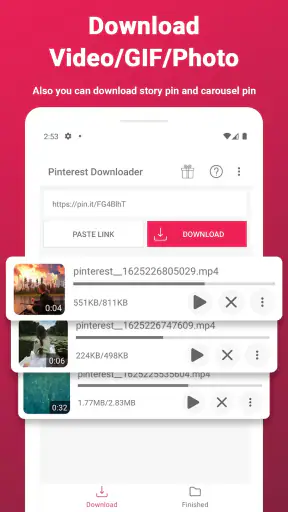
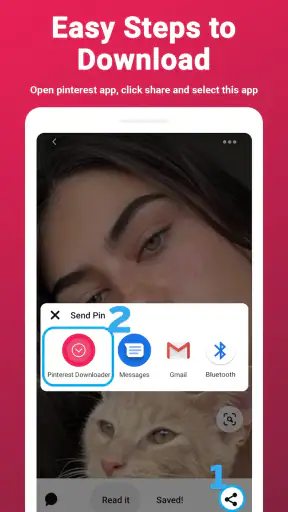
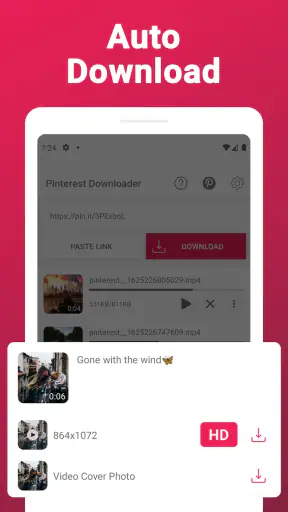
The most natural workflow is straightforward: find something interesting in Pinterest, use the platform’s sharing action, choose the downloader, and save the selected media. That makes sense for short clips, reference images, animated GIFs, craft demonstrations, recipes, workout ideas, or visual material you want available when you are not browsing. I especially like this kind of tool when I am collecting several ideas for a project and do not want to depend on whether the original post will load later.
There is a useful distinction between saving a pin inside Pinterest and downloading the actual media to the device. A Pinterest save keeps the item organized in your account, while a downloader is intended to create an offline copy. That difference matters if you are preparing a folder of visual references, traveling with limited connectivity, or sending a file through a workflow that does not begin inside Pinterest. The app is most valuable when you already know why you need the local file.
Speed expectations should remain realistic. The app can make the handoff from Pinterest to a saved file feel quicker than manually searching for a separate download method, but the final result still depends on the source post, the network connection, and the size of the media. A short clip and a large image collection are not comparable tasks. I would not treat the app as a way to make a slow connection fast; its advantage is reducing unnecessary steps.
For a single download, the experience is likely to feel light because the job is narrow. The bigger benefit appears when the same action must be repeated. Instead of copying information into a browser-based service, waiting for a conversion page, and dealing with unrelated buttons, a dedicated Pinterest tool keeps the process centered on the content you selected. That is a practical improvement, even if it does not change the underlying download time.
Where it helps during a busy saving session
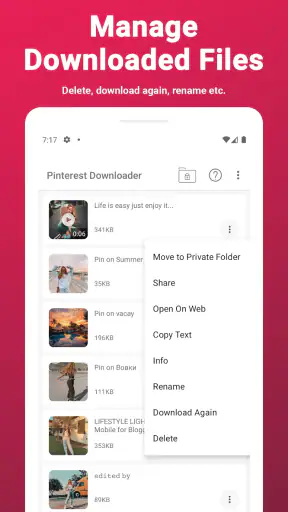
Heavy use is where I would pay closer attention. Saving one image is easy to understand, but collecting many videos and GIFs can create a messy phone unless I decide on an organization method first. Before starting, I would create a dedicated folder or album for the project, then download only the items I genuinely plan to use. This is a small habit, but it prevents the common problem of having a full gallery with no idea which files came from which board.
A realistic example would be planning a weekend craft session. I might gather a few short demonstration clips, several reference images, and an animated example of a finished result. Pinterest is excellent for discovery, but repeatedly opening each pin while working can be distracting, especially when the connection is unreliable. Saving the material beforehand gives me a more predictable reference set. The trade-off is that I must manage the copies myself afterward rather than relying on Pinterest’s board structure.
Another non-obvious use is temporary research. If I am comparing room layouts, collecting outfit combinations, or preparing a presentation mood board, local images can be easier to inspect together than scattered pins. I would download only what is necessary, rename or sort the files if the phone allows it, and delete the temporary collection when the task is finished. The app is therefore better as a capture step in a larger workflow than as a complete media library.
When saving several items, I would also avoid tapping repeatedly before checking whether the previous action has finished. Any downloader can become confusing if multiple requests are launched without clear feedback. A patient one-at-a-time workflow is less exciting, but it makes it easier to identify which file succeeded and which one needs another attempt. This is especially important with videos, where file size and network conditions can make the process less immediate than saving a still image.
Resource demands are another reason to be selective. Images are generally easier to store and review than video files, while GIFs can be surprisingly large for something that looks small on screen. A phone with limited free space may feel fine during a quick test and become crowded after a long collection session. I would check available storage before downloading a large batch and remove duplicates afterward. The app’s purpose is convenient, but convenience can encourage unnecessary saving.
Stability, failed downloads, and recovery
Reliability is not only about whether a download starts. It is also about what I can do when a pin is unavailable, a connection drops, or the source changes. Pinterest content can vary from post to post, so I would not assume that every item will behave identically. A successful result with one video does not guarantee that every video, GIF, or image will be equally straightforward.
My preferred recovery approach is simple: confirm that the original pin still opens, retry once on a stable connection, and then move on if the item continues to fail. Repeatedly pressing the same control rarely improves a missing or inaccessible source. If the app leaves a partial file behind, I would check the gallery or file manager and remove the incomplete copy before trying again. This keeps failed attempts from becoming confusing duplicates.
The app is more appealing than a generic online downloader when I want a focused Pinterest workflow, but a browser-based alternative can sometimes be useful for a one-off task on another device. The browser route may avoid installing an app, yet it can introduce extra pages, unclear buttons, or a less comfortable mobile experience. On the other hand, someone who downloads from many different platforms may prefer a broader tool rather than keeping a separate app for Pinterest.
I would also keep expectations clear about offline viewing. Having a file on the phone means I can access that copy without reopening Pinterest, but it does not turn the app into a streaming service, editor, or social organizer. If I need trimming, captions, color adjustments, or a polished export, I would use a dedicated editor afterward. If I need boards, comments, and creator updates, I would return to Pinterest. The downloader sits between those two experiences.
One practical recovery tip is to keep the source context while collecting. I would note the board or creator in my own project notes when the material matters, because a downloaded file may not retain the context that made the pin useful. This is particularly important for tutorials or design references. The app can preserve the media, but I remain responsible for remembering where it came from and how I intend to use it.
Device limits and Android compatibility
Video Downloader for Pinterest requires Android 6.0 or later, so it is aimed at a broad range of Android phones and tablets rather than only recent hardware. That compatibility is helpful for people using an older spare phone as an offline reference device. Still, operating-system support alone does not tell me how comfortably a particular device will handle a large collection. Storage, memory, screen size, and general phone condition will have a bigger effect on the overall experience.
On an older phone, I would start with a small test: save one image, one GIF, and one video, then check how easy they are to locate and play. This reveals more than installing the app and immediately downloading a large batch. If the phone has very little free space, the limitation will appear in the saved media rather than in the downloader itself. A compact device may also make file organization more frustrating if the gallery sorts everything together.
The app is a sensible fit for someone who wants occasional Pinterest downloads without paying for a tool. It is also useful for students, hobbyists, travelers, and anyone building a visual reference folder. The Everyone rating makes it broadly accessible, although responsible use still matters: downloading a file does not automatically grant permission to repost, sell, or present someone else’s work as your own. I would use saved material for personal reference unless I had the appropriate rights for anything public or commercial.
There are clear situations where I would skip it. If I rarely use Pinterest, saving items inside the platform may be enough. If I need a powerful media manager, batch processing across many services, or built-in editing, this focused app may feel too limited. It is also not the right answer for someone who wants to preserve the full context of every pin, because a local file and a Pinterest board serve different purposes.
Another device-related consideration is backup. A downloaded file stored on one phone is not necessarily available after a device change or reset. For anything important, I would move the finished collection to a suitable personal backup location and keep the files clearly named. That extra step is outside the downloader’s central job, but it determines whether the saved material remains useful over time.
How it compares with the usual alternatives
The usual alternative is simply using Pinterest’s own save features. That is better when discovery, organization, and returning to the original creator are the priorities. A dedicated downloader is better when I want a local copy for offline reference or a file that can be handled outside the Pinterest browsing experience. Neither option replaces the other; the right choice depends on whether I value account-based organization or device-based access.
A second alternative is a general browser downloader. That may be more flexible for people who work across several websites, and it avoids adding a specialized app. In exchange, the process can be less consistent and less comfortable on a phone. A Pinterest-focused downloader has a clearer purpose, so I would choose it when Pinterest is the service I use most for collecting visual material.
Screen recording is another workaround for video, but I would consider it a last resort. It can capture what is displayed, yet it may include interface elements, notifications, or quality loss, and it creates an extra editing step. A downloader is more appropriate when I want the media itself rather than a recording of my screen. For still images and GIFs, manually saving or using the platform’s own tools may be sufficient, depending on the workflow.
The important trade-off is specialization. Because this app is designed around Pinterest downloads, it should be easier to understand than a large media suite filled with unrelated controls. But that same focus means it is not a universal solution. I would install it for a Pinterest-centered need, not because I expect it to replace every download, file-management, and editing tool on my phone.
My performance verdict after weighing the trade-offs
My overall impression is favorable for the right user. Video Downloader for Pinterest addresses a specific annoyance: turning Pinterest discoveries into offline files without making the process feel like a technical project. Its free price removes the main barrier to testing it, and the large user base and 4.8 average suggest that the focused approach works well for many people.
I would recommend it to someone who regularly collects Pinterest videos, GIFs, or images and wants a repeatable way to keep them on an Android device. I would especially recommend it for temporary projects, travel preparation, visual research, and offline reference folders. The best results come from downloading selectively, checking storage, keeping files organized, and remembering that a local copy does not preserve the full social context of a pin.
I would not recommend installing it merely to save one occasional image if Pinterest already meets that need. I would also choose a broader solution for cross-platform downloading or a dedicated editor for serious video work. Those are not failures of this app; they are boundaries created by its narrow purpose.
In the end, I see it as a practical utility rather than a complete media system. Its perceived speed comes from simplifying the Pinterest-to-device path, its stability depends partly on the source and connection, and its resource impact is shaped mainly by how much media I decide to keep. Used with sensible storage and organization habits, Video Downloader for Pinterest is a convenient offline companion for Pinterest-heavy users, while people seeking advanced editing or universal downloading should look elsewhere.


